Create and publish your first benchmark
Write a benchmark as plain TypeScript, inspect the compiled release, and publish it from the Trunchbull dashboard.
This guide creates a small customer-support benchmark and publishes it from a public GitHub repository. The benchmark has no Trunchbull SDK, CLI, framework, or runtime dependency. It is ordinary TypeScript that exports plain objects.
Create the files
Start with this structure:
support-quality/
├── benchmark.config.ts
└── evals/
    └── refund-window.ts
The config names the benchmark and the eval files that belong to the release:
export default {
  protocolVersion: 1,
  title: "Support Quality",
  version: "1.0.0",
  description: "Checks whether support answers use the correct refund policy.",
  license: "MIT",
  tags: ["support", "policy"],
  defaults: {
    systemPrompt: "Answer the customer directly and concisely.",
    limits: {
      maxSteps: 1,
      maxToolCalls: 0,
      maxOutputTokens: 300,
    },
  },
  evals: ["evals/refund-window.ts"],
}
evals contains explicit file paths relative to the config. Explicit paths
keep release contents reviewable and prevent helper or test files from becoming
benchmark entrypoints.
Write the first eval
Each eval file default-exports one plain object. This example defines two
independently scored cases and uses the built-in contains evaluator:
export default {
  id: "refund-window",
  title: "Refund window",
  description: "Checks standard and holiday refund-policy answers.",
  evaluate: {
    kind: "contains",
    expected: "30 days",
  },
  cases: [
    {
      id: "standard",
      prompt: "How long do I have to return an unopened item?",
    },
    {
      id: "holiday",
      prompt: "How long do I have to return an unopened holiday purchase?",
      evaluate: {
        kind: "contains",
        expected: "60 days",
      },
    },
  ],
}
The release will contain two cases with the exact IDs standard and holiday.
Case IDs are unique across the whole release; Trunchbull does not namespace
them with the eval ID. The second case overrides the eval-level evaluator while
inheriting the eval description and the config system prompt.
Use stable case IDs
A case ID is part of published evidence and must be unique across every eval in the release. Prefix generic IDs yourself, keep IDs stable when wording changes, and use a new ID when the behavior being tested changes.
Add more precise grading when needed
Use the simplest evaluator that represents success:
const evaluators = {
  anyAnswer: { kind: "non_empty" },
  exactAnswer: { kind: "exact", expected: "30 days" },
  requiredPhrase: { kind: "contains", expected: "30 days" },
  acceptedAnswers: {
    kind: "answer_bank",
    answers: ["30 days", "thirty days"],
    forbiddenAnswers: ["60 days"],
  },
}
For structured or domain-specific checks, define an evaluator function directly on the eval object:
interface RefundCase {
  expectedDays: number
}

export default {
  id: "structured-refund",
  cases: [
    {
      id: "standard",
      prompt: 'Return JSON with one field: {"refundWindowDays": number}.',
      data: { expectedDays: 30 },
    },
  ],
  evaluate({ output, caseData }: { output: string; caseData: RefundCase }) {
    try {
      const answer = JSON.parse(output)
      const passed = answer.refundWindowDays === caseData.expectedDays

      return {
        passed,
        score: passed ? 1 : 0,
        message: passed ? null : "The refund window was incorrect.",
      }
    } catch {
      return {
        passed: false,
        score: 0,
        message: "The response was not valid JSON.",
      }
    }
  },
}
Trunchbull compiles custom evaluator code into the immutable release. It does not execute authoring files from the repository during a trial.
Push the repository
Create a public GitHub repository, then commit and push the benchmark files:
git init
git add benchmark.config.ts evals/refund-window.ts
git commit -m "Add support quality benchmark"
git branch -M main
git remote add origin https://github.com/acme/support-quality-benchmark.git
git push -u origin main
Use your repository URL in place of the example.
Publish through Trunchbull
Open Benchmarks → New Benchmark, then select Import from GitHub.
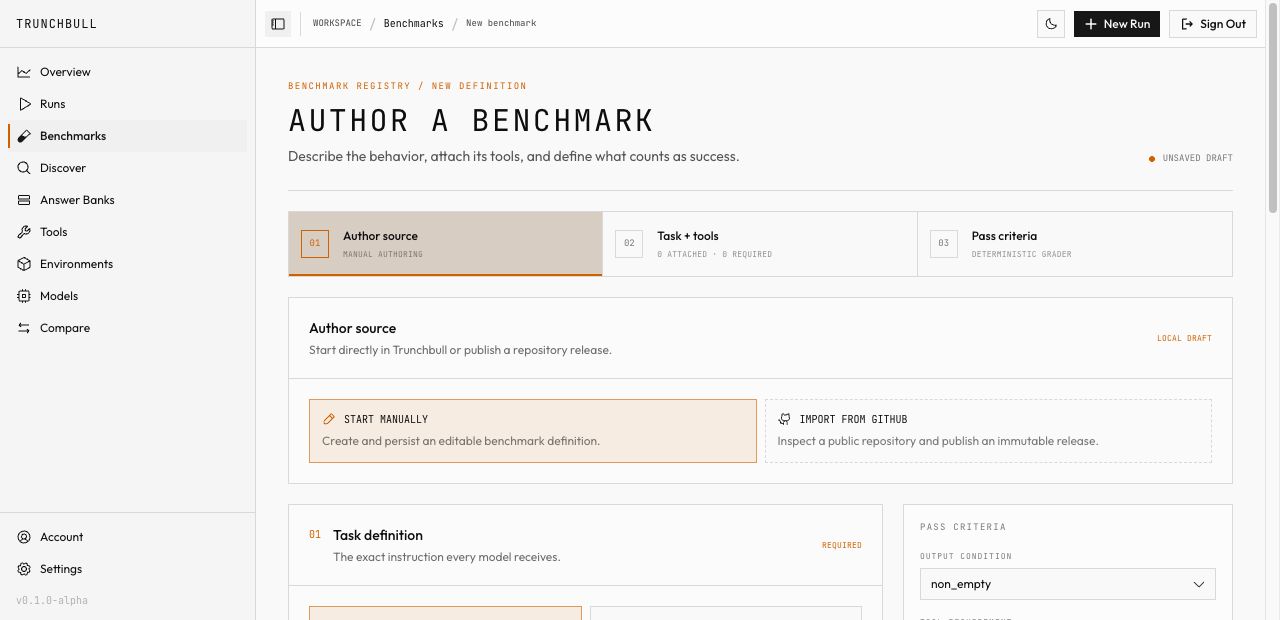
On Publish from GitHub, enter the public repository URL. Pin a branch, tag,
or commit if needed. If benchmark.config.ts is at the repository root, the
config path can be left empty; enter it when publishing from a monorepo.
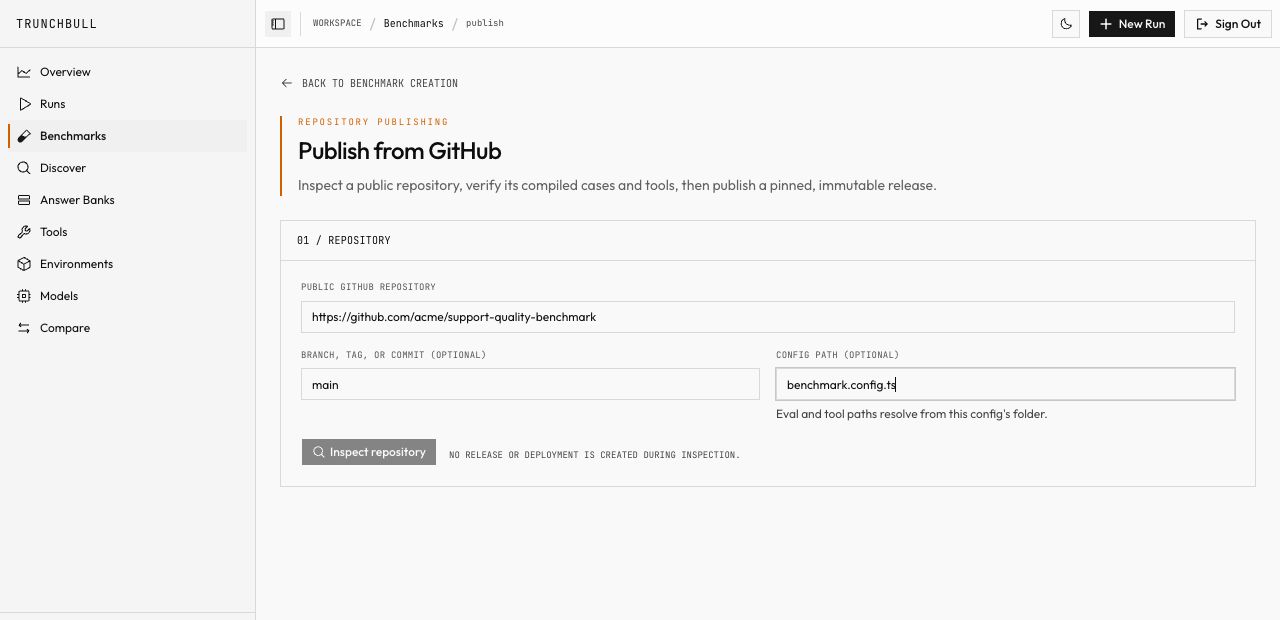
Select Inspect repository. Inspection is read-only: it resolves the commit, compiles the authoring files, expands the cases, and calculates the release digest without creating a release.
Review the compiled title, version, commit, digest, cases, and tools. If they match the repository, select Publish immutable release. The release becomes runnable only after its compiled resources are ready.
□ Repository is public
□ Version identifies this exact content
□ Resolved commit is the commit you reviewed
□ Every expected case appears in the compiled release
□ Evaluators describe the behavior you intend to protect
□ Release reaches READY before you create a run
Next step
Continue with Run your first evaluation, then use the authoring components reference for the complete file contracts and the run configuration reference to size a fair comparison.